How to import candidates via email?
Sterndesk allows recruiters to create candidate profiles by forwarding documents directly via email.
This is one of the fastest ways to add candidates to your database without manually entering information.
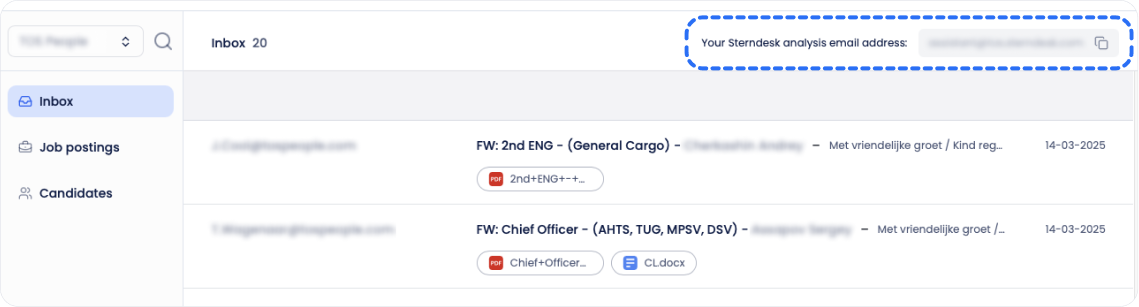
Find Your Import Email Address
Each Sterndesk workspace has a unique email address for candidate imports.
To find it:
- Go to Settings.
- Open the Email Import section.
- Copy your unique import email address.
Import a Candidate
To import a candidate:
- Open your email client.
- Forward the candidate's documents to your Sterndesk import email address.
- Send the email.
You can forward:
- CVs
- Certificates
- Passports
- Medical documents
- Other candidate-related files
The email subject and message content are ignored. Sterndesk only processes the attached files.
What Happens Next?
After the email is received:
- Sterndesk processes the attached documents.
- AI extracts candidate information from the files.
- A candidate profile is created automatically.
- The uploaded documents are attached to the candidate profile.
Depending on the size and number of files, processing may take a few minutes.
Existing Candidates
If the candidate already exists in your database, Sterndesk updates the existing profile instead of creating a duplicate candidate.
Any newly received documents are added to the existing candidate profile.
Review the Candidate
Once processing is complete, the candidate will appear on the Candidates page.
From there, you can:
- Review the extracted information
- View uploaded documents
- Add tags
- Add the candidate to job postings
Best Practice
We recommend forwarding candidate documents from your work email account whenever possible.
This makes it easier to track communication and use candidate-related features within Sterndesk.
Once the candidate is imported, you can review their information in the Candidate Profile.
What Can You See in a Candidate Profile?
Ready to include the candidate in a recruitment process?
How Do I Add an Existing Candidate to a Job Posting?
Can't find what you're
looking for?