
How does search work?
The Search feature in Sterndesk helps you quickly find what you need - whether you're looking for a candidate, a job vacancy, or results across the entire platform.
Instead of manually browsing through long lists, you can use Search to access the right information in seconds.
Search Toggle Options
In the Search bar, you’ll see a toggle that allows you to switch between three search categories:
- All
- Job postings
- Candidates
By selecting the right option, you can control what type of results Sterndesk displays.
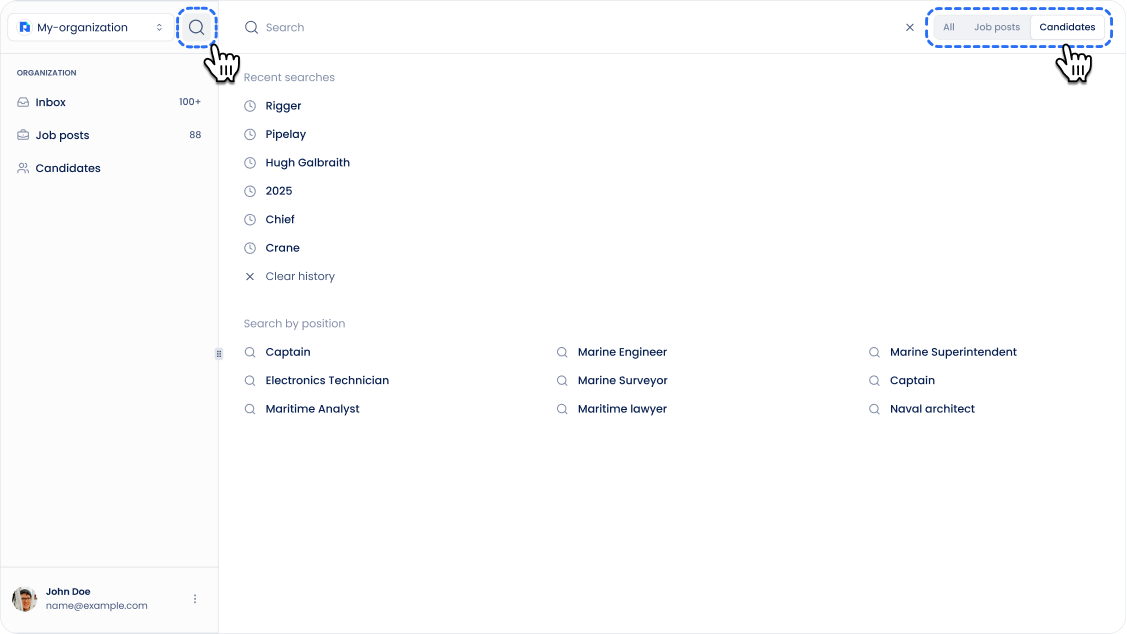
What Each Toggle Option Means
Candidates (Default Option)
This option searches only within your candidate database.
By default, the toggle is set to Candidates, since most users primarily search for candidate profiles.
If you want to learn more about how candidate search works in detail, check out this article:
👉 How does candidate search work?
Example:
You type “Emma” → Sterndesk shows candidates named Emma.
Job postings
This option searches only within your job vacancy list.
Use it when you're looking for a specific vacancy or role.
Example:
You type “Designer” → Sterndesk shows job postings like UI/UX Designer or Product Designer.
All
This option searches across both Job postings and Candidates at the same time.
When selected, the results screen is divided into two sections:
- Job postings
- Candidates
This allows you to see everything that matches your query in one place.
Example:
You type “Marketing” → Sterndesk shows:
- Marketing-related job vacancies in the Job postings section
- Candidates with marketing experience in the Candidates section
Important Note: Select the Correct Search Category
It’s important to choose the correct toggle option before searching.
For example, if you want to find a job vacancy but your toggle is still set to Candidates, you won’t see the expected job posting results.
Tip: Always double-check the toggle before entering your search query.
Can't find what you're
looking for?