How to sort candidates?
Sorting helps you organize the Candidates list based on when candidates were added or last updated.
You can sort candidates directly from the Candidates table.
Sorting by Added
By default, the Candidates table shows the Added column.
Added represents when the candidate was added to Sterndesk.
Candidates are shown with the most recently added candidates first.
Sorting by Updated
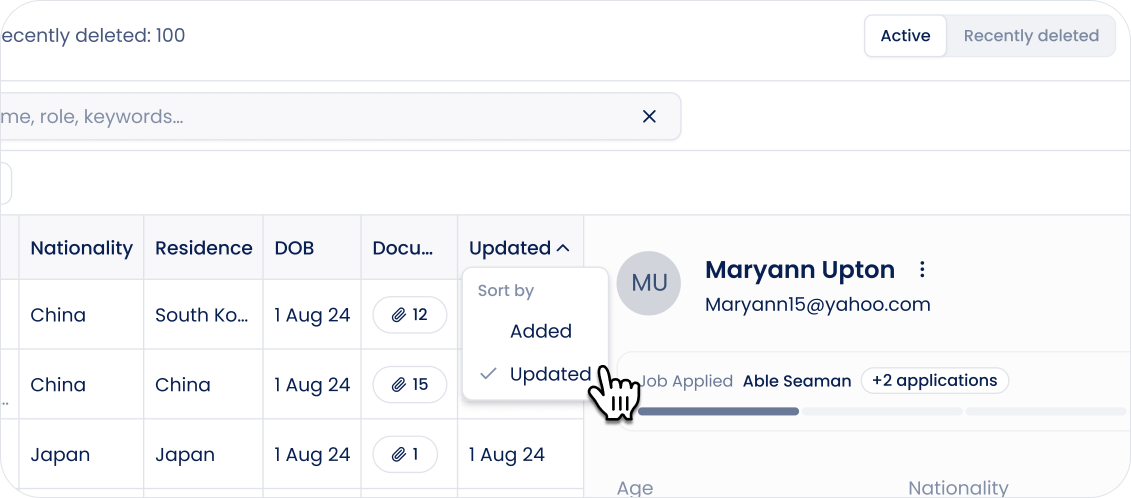
To sort candidates based on their latest update:
- Go to the Candidates page.
- Find the Added column.
- Click the chevron next to Added.
- Switch from Added to Updated.
The column changes to Updated, and the candidate list is re-sorted.
Updated represents when the candidate profile was last updated.
Candidates with the most recent updates are shown first.
Switching Back to Added
To return to the original sorting, click the chevron next to Updated and select Added.
The column changes back to Added, and candidates are sorted by when they were added.
Sorting with Search and Filters
Sorting works together with candidate search and filters.
If you apply filters or enter a search query, Sterndesk keeps the selected Added or Updated sorting and applies it to the matching candidates.
Clearing your filters does not change the selected sorting.
Can't find what you're
looking for?