How to use Pipelines?
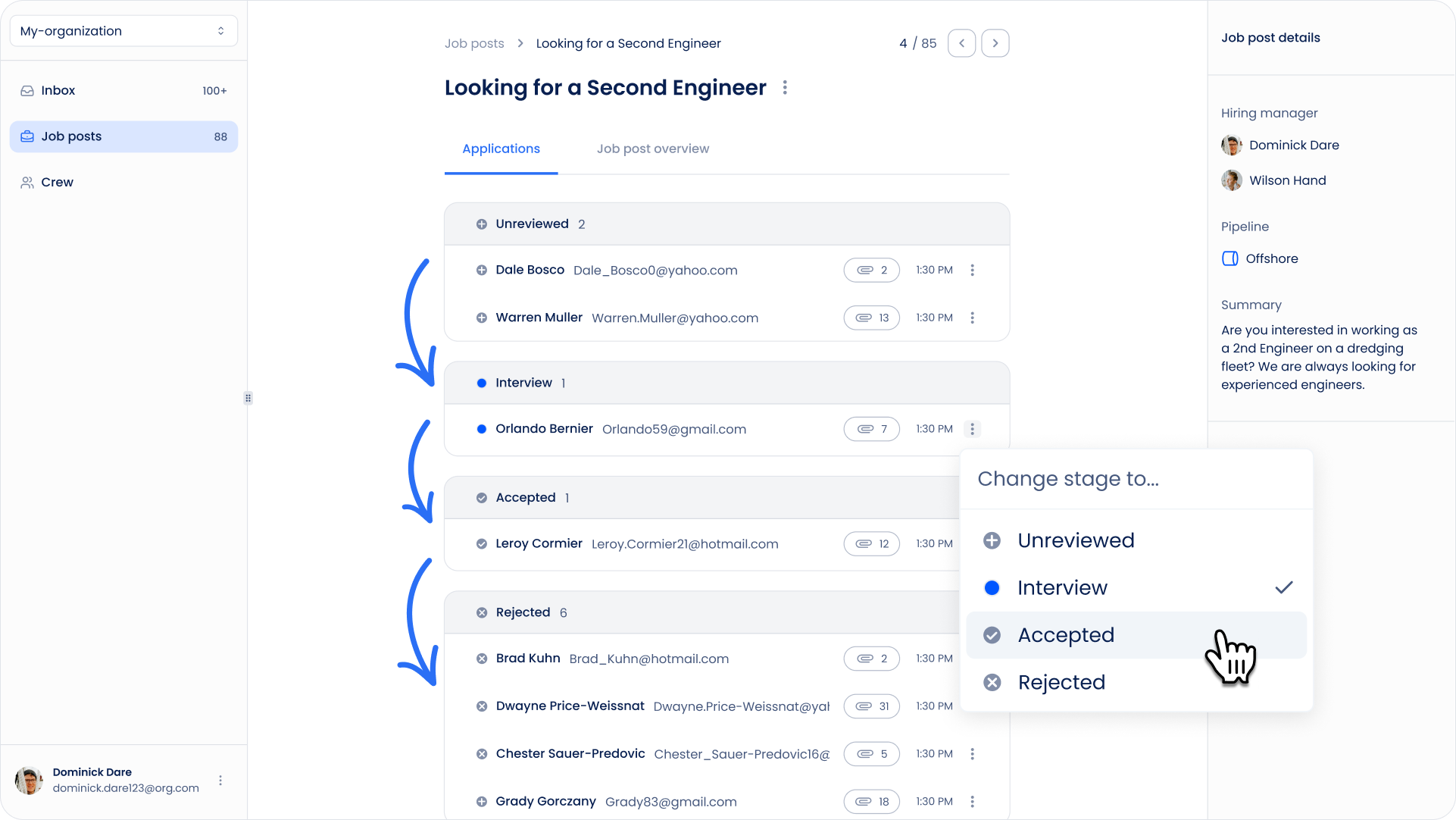
Pipelines help you track candidates as they move through the recruitment process for a specific job posting.
Each pipeline consists of stages that represent different steps in your hiring process.
What Is a Pipeline?
A pipeline is the recruitment workflow connected to a job posting.
For example, a pipeline might include stages such as:
- New
- Phone Interview
- Client Review
- Approved
- Rejected
When a candidate applies for a job or is manually added to it, their application is added to the job posting's pipeline.
Different job postings can use different pipelines depending on the recruitment process.
Understanding Candidate Statuses
Custom pipeline stages can have different Candidate statuses depending on what should happen when a candidate enters that stage.
There are two statuses:
- In Progress — the candidate is still moving through the hiring process.
- Rejected — the candidate is no longer part of the hiring process.
For example, Phone Interview can be an In Progress stage, while Rejected by Client can be a Rejected stage.
This allows you to have multiple rejection stages while Sterndesk still understands which candidates are actively moving through the hiring process.
Learn more about creating stages and setting their Candidate status in How to Create a Pipeline?
Candidate Applications
A candidate profile represents the person in your database, while an application represents their participation in a specific job posting.
This means the same candidate can be part of multiple job postings at the same time.
Each application has its own pipeline and stage, allowing you to track the candidate's progress separately for every job.
Moving Candidates Between Stages
As a candidate progresses through the recruitment process, you can move their application to another stage.
To move a candidate:
- Open the relevant job posting and go to the Pipeline tab.
- Find the candidate.
- Click the ⋯ context menu.
- Select Move to stage.
- Choose the new stage.
The application will be moved to the selected stage.
What Happens When a Candidate Is Rejected?
When you move a candidate to a stage with the Rejected status, Sterndesk considers that candidate no longer part of the active hiring process for that application.
This allows you to use different rejection stages, such as Rejected by Client or Failed Interview, while correctly tracking which candidates are still active.
Important: Moving a candidate to a Rejected stage does not automatically send an email to the candidate. If you want to inform them about the decision, you need to send the communication separately.
Adding Candidates to a Pipeline
Candidates can enter a job posting's pipeline in two ways:
Applying Through the Career Site
When someone applies for a vacancy through your Career Site, Sterndesk creates an application and automatically adds it to the job posting's pipeline.
Learn more in What Happens When Someone Applies for a Job?
Adding an Existing Candidate
You can also manually add an existing candidate from your database to a job posting.
Sterndesk creates an application for that job without creating a duplicate candidate profile.
Learn more in How Do I Add an Existing Candidate to a Job Posting?
Changing a Pipeline
You select a pipeline when creating a job posting.
You can change the selected pipeline while editing the job posting only if there are no candidates in its current pipeline.
Once candidates have been added or have applied to the job posting, you can no longer switch the job posting to a different pipeline.
This protects the candidates' existing recruitment progress and application history.
If you need to use a different pipeline after candidates have already entered the recruitment process, create a new job posting with the required pipeline.
Open and Closed Job Postings
Pipelines remain available inside Sterndesk when a job posting is closed, so you can still review the candidates and their recruitment progress.
Closing a job posting prevents new candidates from applying through the Career Site but does not remove existing applications or their pipeline history.
Important to Know
Pipelines are used to manage and track the recruitment process inside Sterndesk.
Moving candidates between stages updates their internal recruitment status, but does not automatically send acceptance or rejection emails.
If a candidate needs to be informed about a hiring decision, that communication must be sent separately.
Can't find what you're
looking for?